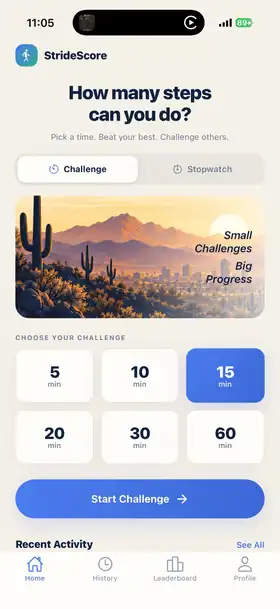
Timed challenges
Pick 5, 10, 15, 20, 30, or 60 minutes and see how many steps you can get before the clock runs out.
 StrideScore
Walking, scored.
Pick a time. Start walking. Beat your best. StrideScore turns everyday walks into simple challenges with personal bests, achievements, routes, Apple Watch support, and more.
Small challenges. Big progress.
No giant fitness dashboard to decipher. Start a session, watch your steps climb, finish with a score, and see how today compares with the walks that came before it.
Pick 5, 10, 15, 20, 30, or 60 minutes and see how many steps you can get before the clock runs out.
Prefer no time limit? Start Stopwatch mode and walk as long as you like.
Turn every session into something measurable and give yourself a score to beat next time.
Optionally track your route, reveal new ground, and build a private map of where you have walked.
Keep your timer and session progress close on Apple Watch and your iPhone Lock Screen.
Collect achievements, build streaks, challenge friends, and compare walking scores.
Designed to feel like the app
Start from the Home screen, then revisit completed sessions with pace, distance, Explore XP, and a map of the ground you covered.


Your first walk
Pick a mode, choose your challenge, and start walking.
Set a target time or keep the walk open-ended.
StrideScore follows your steps, pace, and distance while you walk.
Review your result, route, achievements, and progress.
TestFlight beta
StrideScore is currently in beta. Try it on a real walk and help us improve step syncing, Apple Watch behavior, Live Activities, routes, and the overall experience.
Join the TestFlight beta ↗Open the link on your iPhone and follow Apple’s TestFlight prompts.
Good to know
No. StrideScore works on iPhone. Apple Watch support adds another way to follow and record your session.
No. Route tracking is optional and can be turned off for indoor or treadmill walks.
No. Route geometry is private. Friend features use safe activity totals rather than sharing where you walked.
Pro adds features such as unlimited history, the exploration map, advanced stats, custom challenge lengths, and the full achievement collection.
Send feedback through TestFlight or email StrideScore@ndsoft.dev.